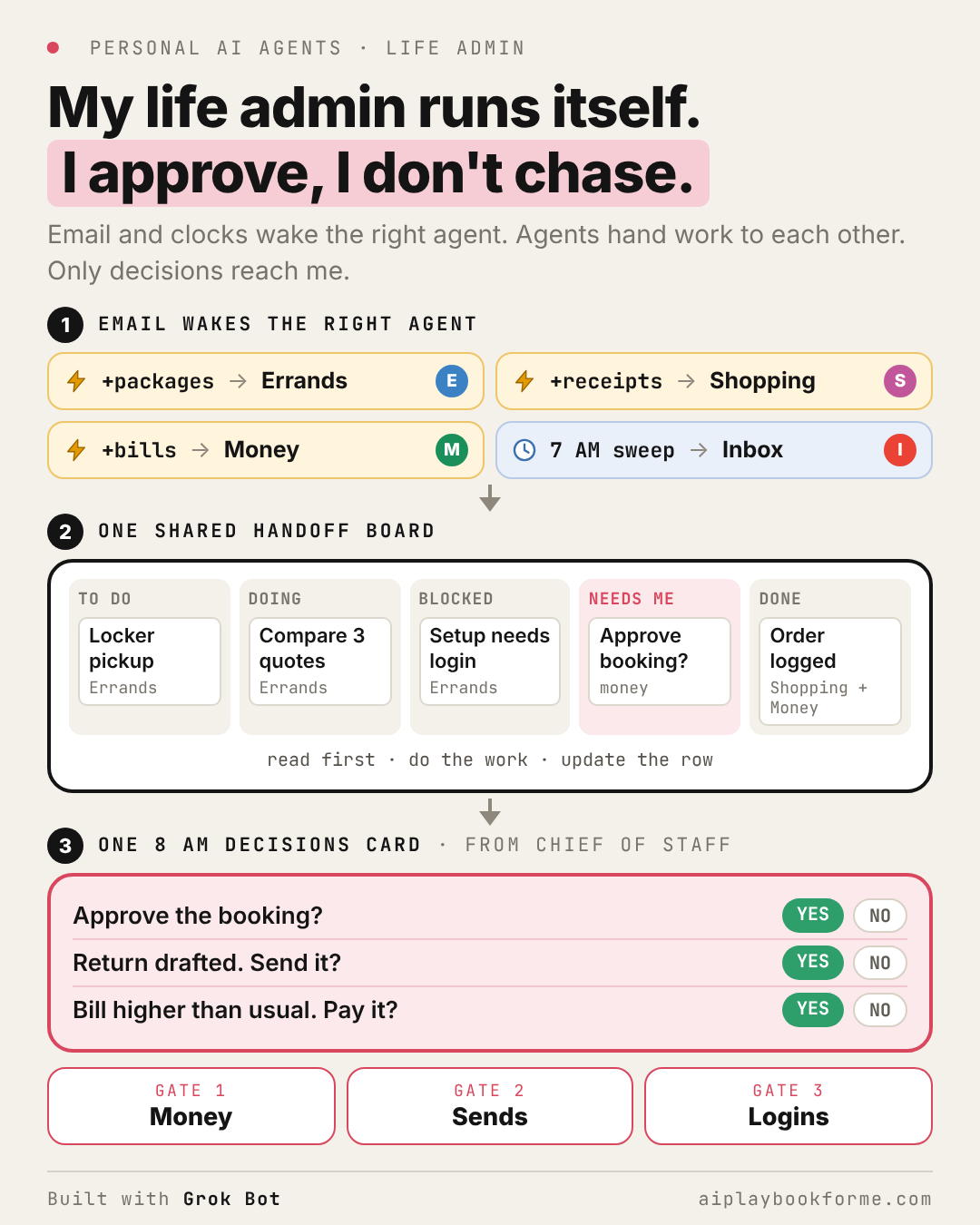
This is a real map of a personal "life admin" setup built with Grok Bot, with every name, place and account removed. We posted it on X because drawing it was the fastest way to see where the owner was still doing the agents' job.
Why you need a workflow, not just more agents
Most people start with one helpful agent (if you are new, read what is an AI agent first). Then they add a second and a third. Each one works fine alone, but the person ends up as the glue: they remember to run each agent, copy the output, paste it into the next agent, and check what is still open.
That is not a team. That is you with three assistants who never talk to each other. A workflow fixes the glue, not the agents.
Part 1: Let events wake the right agent
An agent you have to remember to start is an agent you will forget to start. So give each agent a wake up signal that comes from the world, not from you.
Two kinds work for beginners:
- An email lands. Many tools let you give an agent its own address or a tagged address, like a
+packagesor+billsversion of one inbox. A delivery notice goes to the errands agent. A bill goes to the money agent. You never forward anything. - A set time. A morning sweep at 7 AM that reads the inbox and files what came in overnight. Use a clock only when there is no event to wait for.
Rule of thumb: if the thing you care about sends an email or a notification, wake on that. If it does not, use one calm daily time instead of checking every few minutes.
Part 2: One shared board for handoffs
This is the part most beginners skip, and it is the part that makes agents feel like a team.
Make one plain document every agent reads first and updates last. Five columns are enough:
| Column | What goes there |
|---|---|
| To do | Work waiting for an agent |
| Doing | Work an agent is on right now |
| Blocked | Work stuck on something outside the agent, like a login |
| Needs me | A yes or no only you can give |
| Done | Finished, with the date |
Each row says who owns it and who gets it next, for example "Errands: compare 3 quotes, then Money." When the shopping agent logs an order, the money agent sees it on the board and records the charge. Nobody had to tell it.
Give every agent the same three line habit, right in its instructions:
Before you start: read the shared board and pick up any row assigned to you.
Do the work.
When you finish: update only your own rows, and add a row for the next agent if your work creates one.
"Only your own rows" matters. It stops two agents from overwriting each other. It is the same idea as building checks into the structure instead of piling on rules, which we cover in how to make an AI agent reliable.
Part 3: Only decisions reach you
Your agents should not send you updates. They should send you questions you can answer with yes or no.
In the map, one agent collects every "Needs me" row into a single morning card:
- Approve the booking? Yes or no.
- Return drafted. Send it? Yes or no.
- Bill higher than usual. Pay it? Yes or no.
Three taps and you are done for the day. If you find yourself reading long reports, ask the agent to turn each one into a single decision, or drop it.
The three gates that stay with you
Even a smooth workflow keeps three things behind your yes:
- Money. Any payment, purchase or refund.
- Sends. Any email or message that goes out under your name.
- Logins. Anything that needs your password or a code.
Everything else, like sorting, drafting, comparing and logging, can run on its own. That split is how you build trust with an AI agent without handing it your wallet.
Draw your own map in 15 minutes
You do not need software for this. A sheet of paper works.
- List your agents down the left side, one per line.
- Next to each, write what wakes it. If the answer is "I do," circle it. Every circle is a place you are the bottleneck.
- Draw arrows for every time one agent's output becomes another agent's input. If you carry that output by hand, circle the arrow too.
- Write the decisions that truly need you. Usually it is a short list.
- Fix one circle this week. Swap "I start it" for an email trigger or a daily time, or swap "I copy it over" for a row on the shared board.
Do not redesign everything at once. One fixed circle a week adds up fast.
A starter prompt to set up the board
Paste this into the agent you trust most. It uses our ROCKS formula (Role, Objective, Context, Kind of output, Standards), explained in the ROCKS prompt guide.
Role: You coordinate my small team of AI agents.
Objective: Set up one shared handoff board my agents read first and update last.
Context: My agents are [list each one and its job]. Each one is woken by [email / a set time / me].
Kind of output: A plain board with five columns (To do, Doing, Blocked, Needs me, Done), one example row per agent in the format "[owner] task (from who, date) -> next owner", and a three line habit I can paste into each agent's instructions.
Standards: Agents update only their own rows. Anything involving money, sending a message or logging in goes in "Needs me" and waits for my yes. No made up tasks.
Where this fits in your learning path
If you have zero agents, start with what to automate first and build one. If you have one, add a second using how to build your first AI team. If you have two or more and feel like the glue, this map is your next step. A personal version of this setup is a great first project, since an AI personal assistant touches email, errands and bills. And if you want to try it in Grok Bot, our Grok Bot beginner setup gets you started.
Get the free starter agents
Eight free starter agents, each with a copy and paste prompt, are in our ideas pack. Get the 8 free ideas. Want the step by step build path? Start free with Lessons 1 and 2. The full 5 lesson starter pack is $39 once, no subscription.
FAQ
What is an AI agent workflow? It is how your agents get started, pass work to each other, and get your approval. A simple one has three parts: a trigger that wakes an agent, a shared board for handoffs, and a short list of decisions for you.
Is an agentic workflow the same thing? Mostly, yes. "Agentic workflow" usually means AI that plans and takes steps toward a goal instead of answering one prompt. For a beginner, the practical version is the three part map above.
How many agents do I need before this matters? Two. The moment one agent's output feeds another, you need either a shared board or you become the messenger.
Do I need a special tool for the shared board? No. A shared document both agents can read and edit is enough to start.
What should never be automated? Payments, messages sent under your name, and logins. Keep those behind your yes.
Keep learning
- How to back up your AI agent setup (and get it back fast)
- How to build your first AI team
- How to make an AI agent reliable
- How to build trust with an AI agent
- What to automate first with AI
- What is Grok Bot? A plain-English guide for new users
- The ROCKS prompt guide
- All beginner guides
Try it free: Lesson 1 and the ideas pack
Lesson 1 is free. Answer 2 minutes of tap questions, then set up Grok Bot and connect one app. Lesson 2 (ROCKS prompts and the Prompt Gym) is free too.
Want ideas first? Get 8 free starter agents, each with a copy and paste prompt for Grok Bot.